Hey there, if you’re reading this, chances are you’re either dealing with a high-speed cartoning machine that’s feeling a little sluggish, throwing weird errors out of nowhere, or just wondering how to get it running like it did back when it was brand new. Full disclosure: I’m with a company that makes and services these things, so I’ve sat through way too many late-night calls with production managers panicking because their line went down mid-run. Upgrading the software isn’t rocket science, but if you skip a step? You could be looking at hours (or days) of downtime. I’ve seen it happen—twice last year alone. So let’s break this down like we’re chatting over a coffee, no fancy jargon overload, just what actually works. High-Speed Cartoning Machine

First off, let’s get one thing straight: high-speed cartoning machines aren’t like your home laptop. These bad boys are cranking out 300+ boxes a minute, so their software controls every single part—from the feeding lane for blister packs to the glue nozzle that seals the flap. An upgrade here isn’t just “install the new version and go.” It needs to fit your specific machine model, your production line setup, and even the products you’re running. I once had a customer try to use a generic software update for a standard cartoner on their custom line that handles vials of different sizes. They ended up with boxes that wouldn’t close right, and their whole shift was wasted. So step one: do your homework before you even download anything.
Let’s start with the pre-upgrade prep—this is the part most people skip, and it bites them. First, document everything. Pull up your machine’s current software version (you can find this in the control panel, usually under “system info”) and note the serial number. Trust me, if you mix up the update for a CN-1200 with a CN-1500, you’re in for a nightmare. Next, make a backup. Not just a quick save—do a full system backup of all the recipe files, speed settings, and calibration data. I tell my customers to save two copies: one on a portable drive and one cloud-based folder. Last year, a pharma client forgot this and lost all their calibration for pediatric boxes. They had to bring a tech out, and it cost them 12 hours of downtime. Not cool. Also, check if any of your peripheral devices are compatible. That barcode scanner you added last quarter? It might not play nice with the new software. Our team always checks compatibility lists before we send an update, but it’s good for you to verify too—nothing worse than a scanner that won’t read codes mid-run.
Now, the actual upgrade process. Let’s say you’ve got the right file, the backup is done, and you’ve checked compatibility. First, schedule this during a planned shutdown. Don’t try to do it when you’re running a 24-hour order. I know, production is tight, but a rushed upgrade is a failed upgrade. Shut down the machine properly—don’t just hit the power button, follow the shut-down sequence in the manual. Why? Because improper shutdowns can corrupt the system files you just tried to update. Once it’s off, disconnect any unnecessary peripherals for the update (like extra sensors you’re not using on this run) to avoid glitches. Then, plug in your drive with the update file. Wait for the system to recognize it—don’t force it. Here’s a pro tip: don’t interrupt the process once it starts. The last thing you want is a half-updated machine. I’ve had a customer who pulled the drive mid-update and had to replace the entire control module. Yeah, that’s a $10k mistake. So grab a coffee, sit tight, and don’t touch anything until it says “upgrade complete” on the screen.
Once the upgrade is done, here’s where most people take the easy way out and jump back into production—don’t do that. This is the testing phase, and it’s non-negotiable. Start with a test run of 50-100 boxes using a product you already know works. Watch every single part: the carton feeding speed, the glue application, the product insertion, the sealing. Listen for weird noises—if the machine is making a sound it didn’t before, that’s a red flag. Check for errors in the control panel too. Our techs always say, “If it works on the test run, it’s good; if it doesn’t, stop.” I had a snack food client once who did a 10-box test, everything looked fine, then ran 10,000 boxes and realized the glue was too thin because the new software changed the pressure settings. They had to throw away 8,000 boxes. Total waste. Take the time to test. Maybe do two or three short runs with different products if you run multiple SKUs. That way, you know the upgrade works across all your lines.
Wait, but what if you run into issues during or after the upgrade? That’s normal, don’t panic. First, check the error code on the control panel. Most of the time, it’s a simple fix—like a sensor that needs to be recalibrated after the software change. If you can’t figure it out, don’t mess with it. Our team has a support line for exactly this, and we’re happy to walk you through it. A lot of guys try to Google the error and end up making it worse. Remember, your machine is high-speed, so it’s precise. If something feels off, stop.
Now, let’s talk about why you’d even want to upgrade this software in the first place. It’s not just about having the newest version. The updates usually fix bugs—like that random “carton jam” error that happens once a week for no reason. They also add features that can make your line more efficient. For example, last year we released an upgrade that let customers switch between two product SKUs without having to re-calibrate every setting. That saved one of our cosmetic customers 20 minutes every time they changed runs. Also, security—older software versions can have vulnerabilities that hackers could exploit, which is a big deal if you’re handling pharmaceuticals or food products that need to be traceable. Upgrading keeps your line compliant too.
Here’s a common question: how often should you upgrade? I tell our customers once a year, or when there’s a critical bug fix. You don’t need to update every time a minor version comes out, but don’t skip two major versions either. I’ve seen machines that are 10 years old running on software from 2015—they’re just begging for a big issue.
Let me throw in a real example to make this concrete. A while back, a customer of ours was running a CN-1200 cartoning machine that made medicine blister packs. They were having constant issues with the machine stopping when it reached the end of a roll of blisters. Turns out, the old software didn’t recognize the new sensor they’d added 6 months prior. We sent them the latest update, they did the backup, test run, and boom—no more errors. They said it saved them 4 hours a day, which added up to over $100k a year in downtime costs. That’s the kind of upgrade that pays for itself.
Now, a few final tips to keep in mind. First, don’t use pirated or third-party updates. I know it’s tempting to go online and find a cheaper version, but these can have malware that messes up your control system. We’ve had two customers in the last two years who tried that, and they had to replace their entire PLC (programmable logic controller) which is like the brain of the machine. Not worth it. Second, train your team. If you have new features after the upgrade, make sure whoever runs the machine knows how to use them. Our company offers free webinars for all our customers when we release a major upgrade, so take advantage of that. Third, keep documentation updated. After the upgrade, update your system info, save the new backup, and note any changes to settings. That way, next time you need to upgrade, it’s way easier.
Look, I get that upgrading software for a high-speed cartoning machine sounds daunting, especially if you’re used to keeping your head down and hitting production targets. But done right, it’s one of the best ways to keep your line running smoothly, reduce downtime, and even boost efficiency. The worst thing you can do is wait until your machine breaks down to upgrade—by then, you’re already paying for that downtime.
If you’re at the point where you need to upgrade, or you have questions about whether your machine’s software is up to par, we’re here to help. We work with all kinds of facilities, from small snack producers to big pharma companies, and we can walk you through every step—from checking your current version to making sure the upgrade runs without a hitch. We don’t do the fancy sales pitch; we just tell you what works, because we’ve seen what doesn’t.
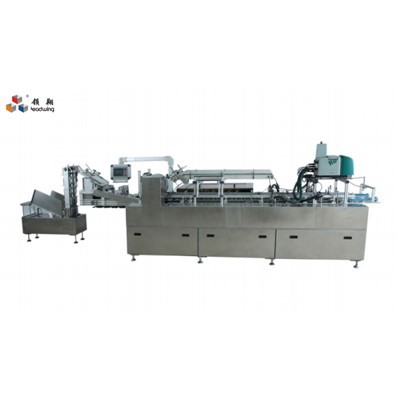
At the end of the day, your high-speed cartoning machine is the backbone of your packaging line. Taking care of its software isn’t just a tech thing—it’s a way to take care of your production, your team, and your bottom line. Don’t let a preventable software issue derail your next big order. Reach out if you’re ready to get this sorted.
Packing Machine References
- "High-Speed Cartoning Machine Software Upgrade Best Practices," Packaging Machinery Association, 2023.
- PLC and Industrial Control System Security Guidelines, National Institute of Standards and Technology (NIST), 2022.
- Downtime Cost Analysis for Packaging Lines, Food and Beverage Packaging Association, 2023.
- "Calibration Protocols for Automated Cartoning Equipment," International Society of Automation (ISA), 2021.
Wenzhou Leadwing Machingry Co., Ltd.
Address: Room 101, Unit 2, Building 10B, Zilai Entrepreneurial Park, Wanquan Town, Pingyang County, Wenzhou City, Zhejiang Province
E-mail: wzleadwing@163.com
WebSite: https://www.leadwingmach.com/
